Meeting Board Pro

Yealink MeetingBoard Pro - All-in-One Digitales Whiteboard für Konferenzräume

authentication teams room authentication zoom roomgeneral mode

Pro Meetings On Board

MeetingBoard Pro

Fürkleine bis große
Besprechungsräume undoffene Räume

mouse-icon
Entwickelt für Einfachheit

Entwickelt für
Einfachheit

Das MeetingBoard Pro kombiniert Video-Konferenzen, Anzeige und
smartes Whiteboarding in einer eleganten, alles-in-einem Lösung, die 10 Minuten
Einrichtungszeit
und einen ordnungsgemäßen Arbeitsplatz bietet.
MeetingBoard Pro, eine elegante Lösung, die Videokonferenzen, Anzeige und digitales Whiteboarding mit einer 10-minütigen Einrichtung für einen aufgeräumten Arbeitsplatz kombiniert.

Treffen Sie sich überall
Wie ein Profi

Verlegen Sie Ihre smarten Meetings überall oder genießen Sie eine aufgeräumte wandmontierte Integration. So oder so, der einfache Weg, um ein hybrides Meeting zu starten.

digitales whiteboardsmart whiteboard

Pro-Ansicht mit mehr Augen

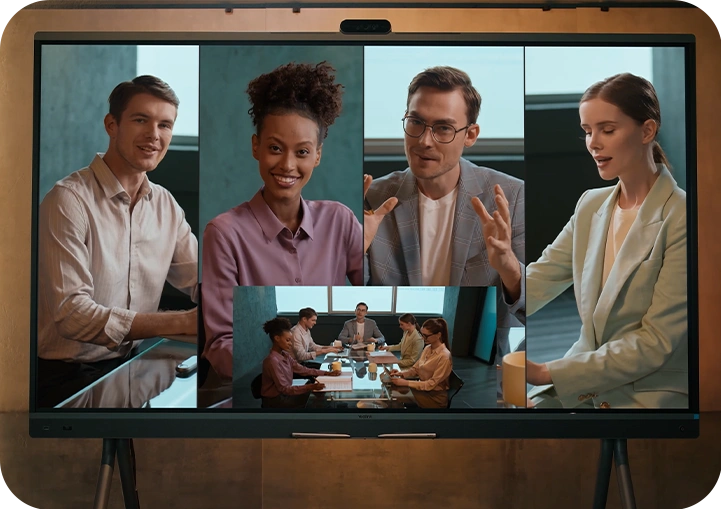
MeetingBoard Pro ist mit einem integrierten drei 50 MP Kamera system ausgestattet, das 

Tele- und Weitwinkelobjektive, verwendet und kristallklare Details auch aus der Ferne gewährleistet. 

Wo immer Sie sitzen, werden Sie immer am besten aussehen.


Sehen Sie es in Aktion

Sehen Sie immer gut aus, egal wo Sie sitzen.

Dreifaches 50-MP-Kamerasystem

Triple 50MP
camera system

12X Pro PTZ-Kamera

12X Pro
PTZ camera

Schnelle und präzise Kamera-KI

Fast and precise
camera AI

Elektrischer Sichtschutz

Electric privacy
shutter

integrierten drei 50 MP Kamera system,digitales whiteboard
Die On-device IntelliFocus-Funktion zeigt in Echtzeit Nahaufnahmen der aktuellen Sprecher, sodass Sie sich auf das Wesentliche konzentrieren können. Fühlen Sie sich frei, Ihre Meinung zu äußern, als wären Sie in einem persönlichen Gespräch.
IntelliFocus
Video Fence
Die Video Fence-Funktion markiert die Grenzen eines virtuellen Besprechungsraums. Ihre Kollegen sehen und hören nur, was innerhalb dieser Grenzen ist, wodurch der Fokus nur auf Ihrem Punkt bleibt.

Erleben Sie KI-gestützte Meetings
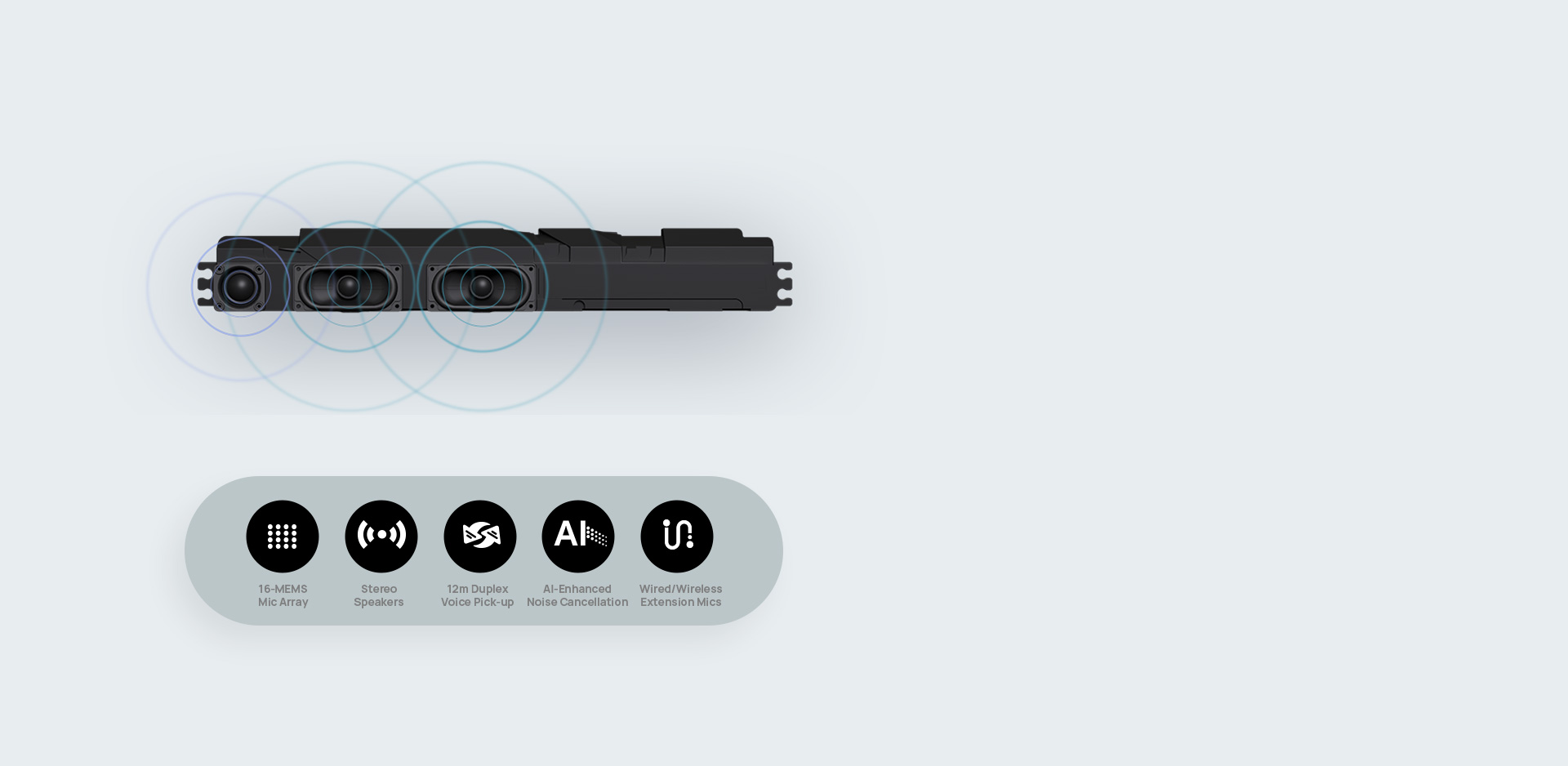
Pro Sound, das für Meetings entwickelt wurde

MeetingBoard Pro bietet immersiven Stereo-Sound mit leistungsstarken 36W Lautsprechern, die eine reichhaltige Klangabdeckung für große Besprechungsräume gewährleisten. Die 16-MEMS-Mikrofonarrays, unterstützt von KI, ermöglichen kristallklare Gespräche und volle Duplexabdeckung bis zu 12 Metern, sodass jede Stimme präzise gehört wird.

Play
Original
Pro Sound
00:00/ 00:00


Pro Core, Flexibilität gesichert

MeetingBoard Pro-Funktionen Android Lösung oder Windows Lösung,

die es Ihnen ermöglicht, Windows und Android auszuwählen, um Ihren Bedürfnissen gerecht zu werden.
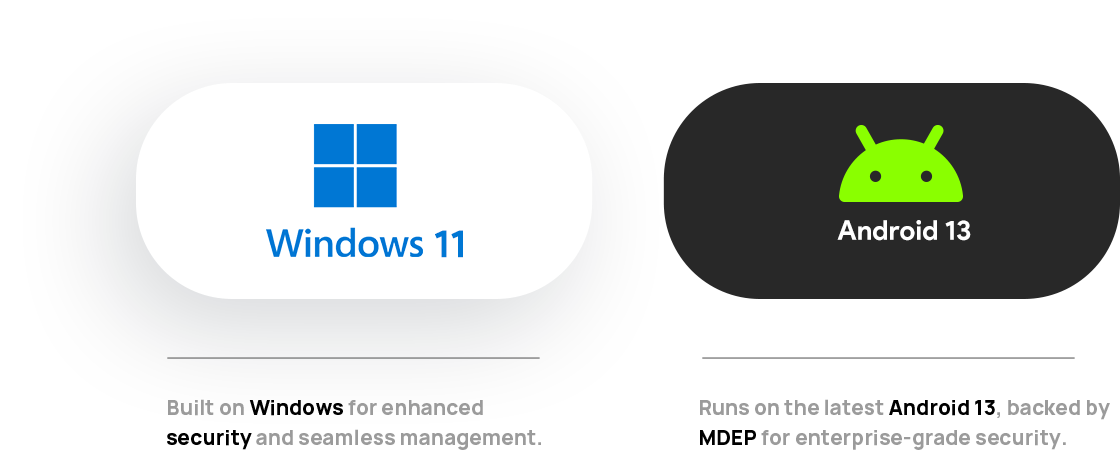


Duales System interaktives whiteboard


*MDEP steht für Microsoft Geräte-Ökosystem-Plattform. MeetingBoard Pro wird bald MDEP unterstützen.                                        
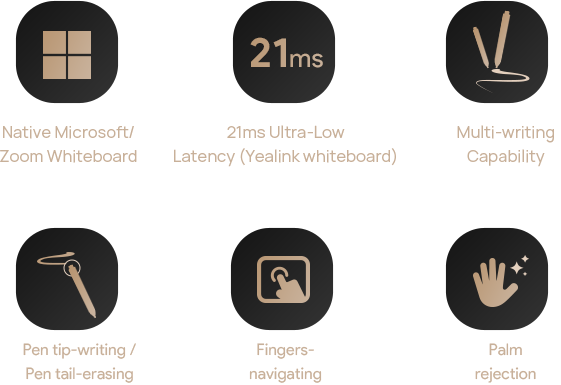


Kostenlose Erstellung
Die MeetingBoard Pro's Premium-Tinte, kollaborative Diagramme und reichhaltige Inhalte fördern Kreativität und Produktivität mit nahtloser Echtzeit Zusammenarbeit für Brainstorming und Planung.
digital whiteboard pen end erase lines
Kostenlose Erstellung
Die MeetingBoard Pro's Premium-Tinte, kollaborative Diagramme und reichhaltige Inhalte fördern Kreativität und Produktivität mit nahtloser Echtzeit Zusammenarbeit für Brainstorming und Planung.
digital whiteboard pen end erase lines


digital whiteboards

Ideen Teilen

kabelloses Whiteboard, Whiteboard mit einem Kabel

*PA20 ist für den US-Markt nicht verfügbar.

Alles anzeigen

Der MeetingBoard Pro verfügt über ein beeindruckendes 4K Multi-Touch-LCD-Display, erhältlich in 65, 75 oder 86 Zoll, das lebendige Farben und präzise Beleuchtung bietet. Mit blendschutzbeschichtungen garantiert es hervorragende Lesbarkeit und ein nahtloses, natürliches Touchscreen-Erlebnis.


4K Multi-Touch-LCD-Display,interaktives whiteboard


Treffen Sie Ihren Weg

Yealink MeetingBoard Pro unterstützt verschiedene Cloud-Meeting-Plattformen

Ganz gleich, welche Plattform Sie verwenden, starten Sie Ihr Meeting jetzt!


Digitale Whiteboards mit doppelter Authentifizierung

A/V
Erweitern
Meeting-Steuerung
Raumplan
Konferenzraum Steuerungs-Panel

Kleines Zimmer

MeetingBoard 65 Pro

Small
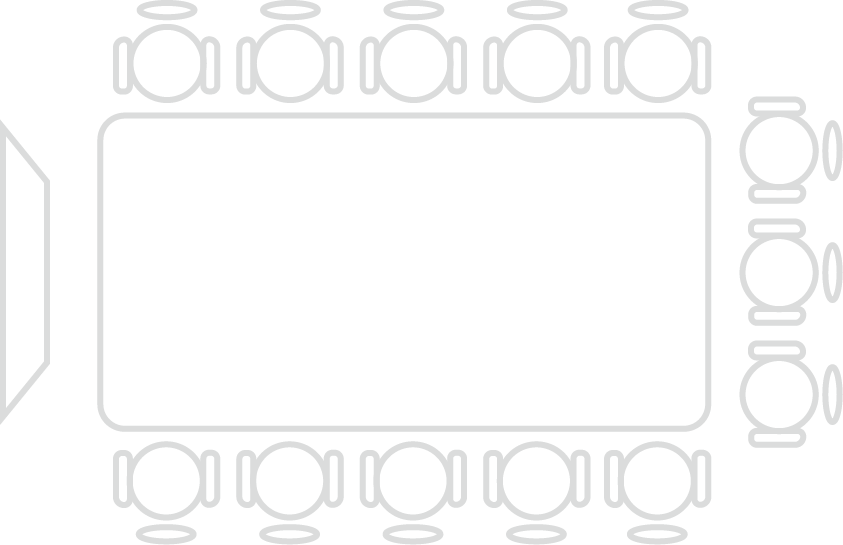
1-6 Personen

Mittleres Zimmer

MeetingBoard 75 Pro

Medium
6-12 Personen

Großes Zimmer

MeetingBoard 86 Pro

Large
12-20 Personen

Offener Raum und

Exekutivbüro

MeetingBoard 75 Pro

Open space
Small roomMedium roomLarge roomExecutive room
Erweitertes A/V
Small room
1-6 Personen

Entsperren Sie das Pro MeetingBoard mit Yealink

Wie können wir Ihnen helfen?

Sind Sie sich nicht sicher, wie es in Ihr Umfeld passt? Unsere AV-Spezialisten sind hier, um zu helfen.

👉 Holen Sie sich Beratung zur Bereitstellung für Ihren Konferenzraum und Ihr System.
👉 Brauchen Sie ein Angebot? Fordern Sie eine maßgeschneiderte Preisgestaltung an.

Bitte füllen Sie die folgenden Informationen aus und senden Sie sie ab, und unser Vertreter wird Sie bald kontaktieren.

*Dieses Produkt ist für Geschäftskunden bestimmt und wird über autorisierte Business-to-Business-Partner (B2B) vertrieben.

FAQ
Wie kann ich ein Angebot für das MeetingBoard Pro digitales Whiteboard erhalten?
Wie groß sind die Abmessungen und das Gewicht des MeetingBoard Pro digitalen Whiteboards?

      MeetingBoard 65 Pro             MeetingBoard 75 Pro           MeetingBoard 86 Pro      
 Packaging dimensions (W × D × H) 1660 x 220 x 1045 mm 1900 x 225 x 1160 mm 2095 x 225 x 1310 mm
 Bare device dimensions(W × D × H) 1484 x 91 x 955 mm 1705 x 91 x 1081 mm 1950 x 91 x 1218 mm
 With stand dimensions(W × D × H) 1484 x 795 x 1887 mm 1705 x 850 x 1960 mm 1951 x 858 x 2058 mm
 VESA hole specs 600 x 400 mm 800 x 400 mm 800 x 600 mm
 Gross weight 50 kg (110.2 lbs) 65 kg (143.3 lbs) 83.2 kg (183.02 lbs)
 Net weight 40 kg (88.2 lbs) 52.2 kg (115.74lbs) 65.6 kg (144.7 lbs)
 Quantity 1 unit/box 1 unit/box 1 unit/box


Wie wechselt man beim MeetingBoard Pro interaktiven Whiteboard den HDMI-Modus zwischen Cast- und Signal-Modus? (Android-Modus)

Wie kann man den HDMI-Eingangsmodus zwischen Cast- und Signalmodus umschalten?

Bei MeetingBoard Pro-Versionen 331.320.0.30 und höher können Sie den HDMI-Eingangsmodus zwischen Cast-Modus und Signalmodus im IP-Web-Backend umschalten: System > Screencast-Seite. Der Standardmodus ist der Cast-Modus.


Cast-Modus:

Kann mit Remote-Teilnehmern in Anrufen über Teams/Zoom-Apps geteilt werden und bietet die gleiche Erfahrung wie VCH51.


Signalmodus:

Kann nur lokal angezeigt werden und nicht mit Remote-Teilnehmern in Anrufen über Teams/Zoom-Apps geteilt werden. Bietet das gleiche HDMI-Erlebnis wie das MeetingBoard der ersten Generation.


Das digitale Whiteboard MeetingBoard Pro hat den physischen Quellumschaltknopf entfernt. Wie kann man die Quelle umschalten? (Android-Modus)

Das digitale Whiteboard MeetingBoard Pro verfügt nicht mehr über eine physische Taste zum Umschalten der Quelle. Wie kann man die Quelle umschalten?


Methode 1: Klicken Sie auf die seitliche Schublade, um die Symbole für HDMI-Eingang und Windows OPS in der Symbolleiste anzuzeigen. Klicken Sie auf das entsprechende Symbol, um zu HDMI-Eingang oder Windows OPS zu wechseln.


Methode 2: Drücken Sie die Ein-/Aus-Taste. Es erscheint eine Schnittstelle, in deren unteren Bereich Sie die Symbole für HDMI-Eingang und Windows OPS sehen. Klicken Sie auf das entsprechende Symbol, um zu wechseln.


Methode 3: Im allgemeinen Modus befinden sich in der unteren rechten Ecke des Startbildschirms die Symbole „HDMI in“ und „Windows OPS“. Klicken Sie auf das entsprechende Symbol, um zu wechseln.


Hinweis: Die oben beschriebenen Symbole zum Umschalten der Quelle sind nur sichtbar, wenn:

„HDMI in“ im Signalmodus ist und ein Gerät angeschlossen ist.

„Windows OPS“ angeschlossen ist.

Which AI modes does the MB-12X Pro currently support?(Android Mode)

Which AI modes does the MB-12X Pro currently support?

Currently, the MB-12X Pro supports in Manual, Speak Tracking, Auto-Framing , and Picture-in-Picture (PIP) modes. But the Intellifocus mode is not yet supported and is expected to be added in the Q3 version.


Kann die PTZ 6X/12X-Kamera der ersten Generation des MeetingBoard mit dem MeetingBoard Pro verwendet werden? (Android-Modus)

Kann die PTZ 6X/12X-Kamera der ersten Generation des MeetingBoard mit dem MeetingBoard Pro verwendet werden?


Nein.


Aufgrund ihrer Bauweise ist die PTZ 6X/12X-Kamera der ersten Generation nicht mit dem MeetingBoard Pro kompatibel. Sie müssen die MB-12X Pro-Kamera mit dem MeetingBoard Pro verwenden.


Welche Kombinationsmöglichkeiten gibt es für die Verwendung von CM20/CS10 mit dem integrierten Lautsprecher und Mikrofon des MeetingBoard Pro? (Android-Modus)

Welche Kombinationsmöglichkeiten gibt es für die Verwendung von CM20/CS10 mit dem integrierten Lautsprecher und Mikrofon des MeetingBoard Pro?


Option 1: CM20 + CS10

CM20 + CS10 unterstützt bis zu 4+4 Einheiten. (Erfordert MeetingBoard Pro Version 331.320.0.30 oder höher)


Option 2: CM20 + integrierter Lautsprecher des MeetingBoard Pro für die Audioausgabe

CM20 + integrierter Lautsprecher des MeetingBoard Pro für die Audioausgabe, unterstützt bis zu 4 externe CM20-Einheiten. Das integrierte Mikrofon des MeetingBoard Pro wird in diesem Szenario nicht für die Audioaufnahme verwendet. (Erfordert MeetingBoard Pro Version 331.320.0.30 oder höher)


Unterstützt MeetingBoard Pro Dual-Screen? (Android-Modus)

Unterstützt MeetingBoard Pro Dual-Screen?


Ja.


Das MeetingBoard Pro verfügt über einen HDMI-Ausgang, der eine Ausgabe mit 4K@60Hz unterstützt und somit Dual-Screen-Konfigurationen ermöglicht. Wenn der externe zweite Bildschirm touchfähig ist, kann durch den Anschluss über USB die Dual-Screen-Touch-Funktionalität aktiviert werden.


Welche Casting-Methoden unterstützt MeetingBoard Pro? (Android-Modus)

Welche Casting-Methoden unterstützt MeetingBoard Pro?

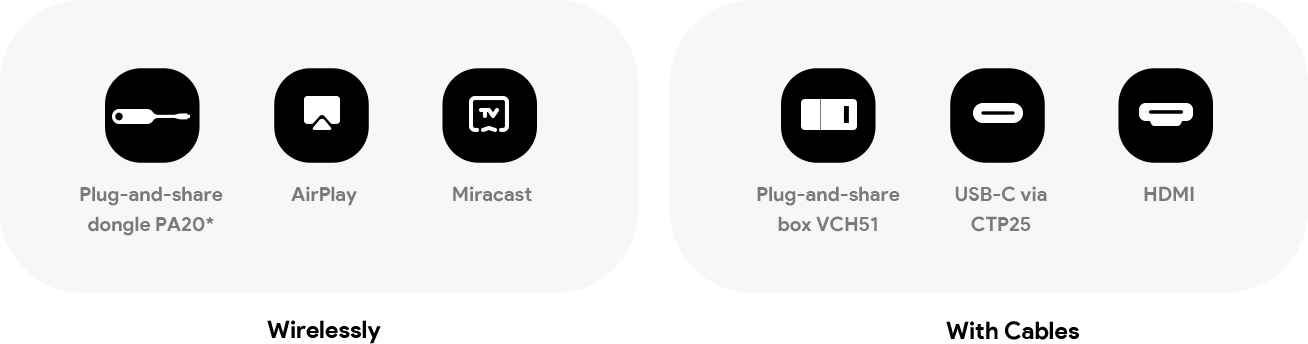
Drahtlos

PA20*/WPP30*/Miracast/AirPlay


Mit Kabeln

VCH51/CTP25/HDMI-Eingang


Sonstige

Yeacast App*/Teams/Zoom App Casting


Hinweis:

*PA20&WPP30 sind für den US-Markt nicht verfügbar.


*Nur im allgemeinen Modus verfügbar.


Wie aktiviere ich Miracast auf MeetingBoard Pro? (Android-Modus)

Wie aktiviere ich Miracast auf MeetingBoard Pro?

MeetingBoard Pro sind gegenseitig exklusiv, die Miracast-Funktion ist standardmäßig deaktiviert. Um Miracast-Bildschirmübertragung zu aktivieren, führen Sie die folgenden Schritte aus:


Greifen Sie auf das webbasierte IP-Backend zu und schalten Sie den WLAN-Dienstmodus auf Modus 2 um:


Netzwerk > WLAN-Dienstmodus > Auswahl des WLAN-Modus > Modus 2


Navigieren Sie zum Bildschirmübertragungsverzeichnis und aktivieren Sie die Miracast-Bildschirmübertragungsfunktion.


Welche BYOD-Methoden unterstützt MeetingBoard Pro? (Android-Modus)

Welche BYOD-Methoden unterstützt MeetingBoard Pro?

PA20: IP BYOD


WPP30: IP BYOD


VCH51: Kabelgebundenes BYOD


CTP25: Kabelgebundenes BYOD


HDMI-Eingang + USB-B: Kabelgebundenes BYOD


Yeacast-App: IP BYOD, nur im allgemeinen Modus verfügbar


Hinweis:

*PA20 und WPP30 sind auf dem US-amerikanischen Markt nicht verfügbar.


Wie kann man PA20/WPP30 und VCM36W im Windows-Only-Modus (MTR-W-Modus) koppeln?

Wie kann man PA20/WPP30 und VCM36W im Windows-Only-Modus koppeln?


A. Für Versionen vor xxx:


Methode 1: Koppeln Sie die Geräte während der OOBE-Phase (Out-of-Box Experience), bevor Sie den Windows-Only-Modus auswählen.


Methode 2: Verwenden Sie YRC, um auf das MeetingBoard Pro-Web-Backend zuzugreifen. Wechseln Sie unter „System > Device Interface“ die USB-Kanalzuweisung zu „Android“. Stecken Sie PA20/WPP30/VCM36W zum Koppeln ein. Nach erfolgreicher Kopplung wechseln Sie die USB-Kanalzuweisung zurück zu „Windows“.


B. Für MeetingBoard Pro 331.320.1.42 oder höher und YRC 2.35.27.0 oder höher


Stecken Sie PA20/WPP30/VCM36W einfach in den USB-Anschluss an der vorderen unteren linken Ecke des MeetingBoard Pro-Gehäuses, um die Kopplung durchzuführen. Eine OOBE-Kopplung oder eine Umschaltung des USB-Kanals im Web-Backend ist nicht erforderlich.


Unterstützt MeetingBoard Pro + MCore OPS-T die Geräteverwaltung über YMCS? (MTR-W-Modus)

Unterstützt MeetingBoard Pro + MCore OPS-T die Geräteverwaltung über YMCS?


Ja.


Das MeetingBoard Pro kann über das YRC Berichte an YMCS zur Geräteverwaltung senden. Derzeit unterstützte Funktionen umfassen die Meldung grundlegender Informationen, manuelle und automatische Firmware-Push-Updates sowie grundlegende Diagnosen.


Welche Zubehörteile werden mit MeetingBoard Pro + MCore OPS-T unterstützt und wie sollten sie angeschlossen werden? (MTR-W-Modus)

Welche Zubehörteile werden mit MeetingBoard Pro + MCore OPS-T unterstützt und wie sollten sie angeschlossen werden?


PA20, WPP30, VCH51. PA20 und WPP30 werden zum Koppeln direkt an einen USB-Anschluss am MeetingBoard Pro-Gehäuse angeschlossen.


CM20 + CS10: Unterstützt bis zu 4+4 Einheiten. An den VCH-Anschluss am MeetingBoard Pro-Gehäuse anschließen.


AP08: Unterstützt. Erfordert AP08 + CM50 + CS10-D. Schließen Sie AP08 über USB an MeetingBoard Pro an.


Anwendungsfall 1:


Verwendung von AP08 mit CM50 und CS10-D für Audio-I/O, während für Video die integrierte Kamera oder ein an Android angeschlossenes UVC86 verwendet wird. AP08 muss mit dem Android-Host verbunden sein (hauptsächlich für die Audio-Referenz, um Anomalien bei der KI-Verfolgung zu vermeiden). Da die USB-Anschlüsse im Windows-Only-Modus standardmäßig auf Windows OPS eingestellt sind, wechseln Sie die USB-Anschlusszuweisung im Web-Backend (System > Geräteschnittstelle) auf „Nur für Android”.


Anwendungsfall 2:


Verwendung von AP08 mit CM50 und CS10-D für Audio-I/O und UVC86, das über AVHUB für Video angeschlossen ist. Da die integrierte Audio-/Videofunktion nicht verwendet wird, schließen Sie sowohl AP08 als auch UVC86 an den AVHUB an (ähnlich wie bei MVC-Konfigurationen).


VCM35: Unterstützt. Schließen Sie das Gerät an den VCH-Anschluss am MeetingBoard Pro-Gehäuse an.


VCM36W: Unterstützt bis zu 4 Geräte. Schließen Sie das Gerät zum Koppeln an einen USB-Anschluss am MeetingBoard Pro-Gehäuse an.


UVC86: Unterstützt. Es können bis zu 4 Geräte angeschlossen werden, aber es kann jeweils nur eines als aktive Videoquelle ausgewählt werden.


MB-12X Pro: Unterstützt.


MTower: In Anpassung. Unterstützung voraussichtlich im 3. Quartal.


MTouch Plus-MB: In Anpassung. Unterstützung voraussichtlich im 3. Quartal.


AVHub: Unterstützt, wenn alle Audio-/Video-E/A-Geräte als Zubehör an den AVHUB angeschlossen und nicht mit integrierten Modulen gemischt sind. Schließen Sie den AVHUB über USB an Windows OPS an.



Contact Sales Button-yd-unique
Your Privacy
Strictly Necessary Cookies
Preferences Cookies
Statistics Cookies
Targeted Cookies
PRIVACY PREFERENCE CENTER
When you visit any website, the website stores or retrieves information from your browser, mostly in the form of Cookies. This information may relate to your personal information, preferences or device information and is used primarily to enable the website to provide the services you expect. This information does not usually directly identify you personally, but can provide you with a more personalized web experience. We fully respect your privacy, so you can choose not to allow certain types of Cookies, simply by clicking on the name of a different Cookie category to learn more and change the default settings. However, blocking certain types of Cookies may affect your experience with the site and the services we can provide to you.
Learn more ->
Strictly Necessary Cookies
Always On
These Cookies are essential for users to navigate the site and use its features, which are necessary for the proper functioning of the site, and cannot be turned off on our system. They are set only for actions you do that are equivalent to service requests, such as setting up your login or populating a form.You can set your browser to block or alert you to such Cookies, but some features of the site will not work. These Cookies do not store any personally identifiable information.
Learn more ->
Preferences Cookies
These cookies are mainly used to record users' preferences while browsing the website and using its features. These cookies allow the website to remember your interactions with the website, choices you have made in the past and information you have entered, such as your preferred language or what your username and password are, so you can be logged in automatically. If you do not allow the use of such Cookies, you will not be able to enjoy a more convenient experience with the site.
Learn more ->
Statistics Cookies
These Cookies allow us to count the number of visits to our website and the sources of traffic in order to evaluate and improve the performance of our website. These Cookies also help us to understand the popularity of our pages and the activity of our visitors on the site. All information collected by such Cookies is aggregated to ensure that it remains anonymous. If you do not allow the use of such Cookies, we will have no way of knowing when you visit our site and will not be able to monitor site performance.
Learn more ->
Targeted Cookies
These Cookies may be set by our advertising partners through our website and may also be used by those companies to create profiles of your interests and to display relevant advertisements to you on other websites. These Cookies do not store personal information directly, but use some information that uniquely identifies your browser and Internet device. If you do not allow the use of such Cookies, the advertisements you see will be less targeted.
Learn more ->
PRIVACY PREFERENCE CENTER
Your Privacy
Your Privacy
When you visit any website, the website stores or retrieves information from your browser, mostly in the form of Cookies. This information may relate to your personal information, preferences or device information and is used primarily to enable the website to provide the services you expect. This information does not usually directly identify you personally, but can provide you with a more personalized web experience. We fully respect your privacy, so you can choose not to allow certain types of Cookies, simply by clicking on the name of a different Cookie category to learn more and change the default settings. However, blocking certain types of Cookies may affect your experience with the site and the services we can provide to you.
Learn more ->
Strictly Necessary Cookies
Always On
These Cookies are essential for users to navigate the site and use its features, which are necessary for the proper functioning of the site, and cannot be turned off on our system. They are set only for actions you do that are equivalent to service requests, such as setting up your login or populating a form.You can set your browser to block or alert you to such Cookies, but some features of the site will not work. These Cookies do not store any personally identifiable information.
Learn more ->
Preferences Cookies
Preferences Cookies
These Cookies are primarily used to record the preferences of users as they navigate the site and use its features. These Cookies allow the website to remember the choices you have made in the past, such as which language you prefer or what your username and password are, so that you can automatically log in. If you do not allow the use of such Cookies, you will not be able to enjoy a more convenient experience with the site.
Learn more ->
Statistics Cookies
Statistics Cookies
These Cookies allow us to count the number of visits to our website and the sources of traffic in order to evaluate and improve the performance of our website. These Cookies also help us to understand the popularity of our pages and the activity of our visitors on the site. All information collected by such Cookies is aggregated to ensure that it remains anonymous. If you do not allow the use of such Cookies, we will have no way of knowing when you visit our site and will not be able to monitor site performance.
Learn more ->
Targeted Cookies
Targeted Cookies
These Cookies may be set by our advertising partners through our website and may also be used by those companies to create profiles of your interests and to display relevant advertisements to you on other websites. These Cookies do not store personal information directly, but use some information that uniquely identifies your browser and Internet device. If you do not allow the use of such Cookies, the advertisements you see will be less targeted.
Learn more ->
Except for necessary cookies, we may also use functional cookies (including third party cookies) to deliver experience for you. You can turn them off by clicking “configure". More information in cookies policy.
Configure I Accept