Calling and Connected Line Identification Presentation on Yealink IP Phones


This guide provides some enhancementsof calling and connected lineidentification presentation supportedon Yealink IP phones. Yealink IP phones support derivingcalling and connected line identificationfrom SIP headers and display the name associated with the telephone number on the LCD screen.
This guide applies to the following Yealink IP phones:
SIP-T58A,SIP VP-T49G, SIP-T48G,SIP-T46G, SIP-T42G, SIP-T41P, SIP-T40P, SIP-T29G, SIP-T23P/G, SIP-T21(P) E2, SIP-T19(P) E2, CP860, CP960and W56P IP phones running firmware version 80 or later
SIP-T48S, SIP-T46S, SIP-T42S, SIP-T41S,SIP-T40G, SIP-T27G, CP920, W60Pand W52PIP phones running firmware version 81 or later
VP59, W53PandCP930W-BaseIP phones running firmware version 83or later
SIP-T57W, SIP-T54W, SIP-T53W, SIP-T53, SIP-T48U, SIP-T46U, SIP-T43UandSIP-T42UIP phones running firmware version 84or later
SIP-T33P, SIP-T33G, SIP-T31P, SIP-T31G, SIP-T31, SIP-T30P and SIP-T30 IP phones runningfirmware version 85 or later
Calling Line IdentificationPresentation (Abbreviation CLIP), also called Caller ID,Calling Number Identification, is a telephone service available in Voice over Internet Protocol (VoIP). That transmits a caller's number to thecalled party during the ringing signal. Calling line identification presentationcan also provide a name associated with the calling linenumber. The information transmitted to the called party may be displayed on the phone LCD screen.
Configuring the Yealink IP PhonesYealink IP phones support to derive calling line identificationfrom the FROM, P-Preferred-Identity, P-Asserted-Identity and Remote-Party-ID SIPheaders in the INVITE request.
Users can configure the calling line identificationsourceforYealink IP phones via the web user interfaceorusing the configuration file.The calling line identification sourceis configurable on a per-account basis.
1.Press ,or press Menu->Statuson the IP phoneto check itsIP address.
2.Open the web browser on the localcomputer.
3.Enter the IP address (e.g. http://192.168.0.10 or 192.168.0.10) in the browser’s address bar, and then click Enter.
4.Enter the User Name(admin) and Password(admin) in the pop-up dialogue box.
5.ClickLog into log in to the web user interface of the IP phone.
6.Click on Account->Advanced.
7.Select the desired valuefor calling line identification sourcefrom the Caller ID Sourcedrop-down menu.
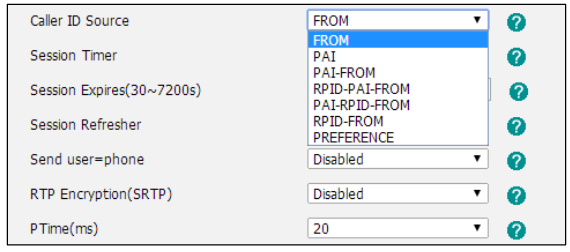
8.Click Confirmto accept the change
1.Add/Edit the calling line identification sourceparameter in the configuration file.
The following table lists the information of parameters:
(For VP59/SIP VP-T49G/SIP-T58A/T57W/T54W/T48U/T48G/T48S/T46U/T46G/T46S/T29G: X ranges from 1 to 16;
For SIP-T53W/T53/T43U/T42G/T42S: X ranges from 1 to 12;For W53P/W60P/CP930W-Base: X ranges from 1 to 8;
For SIP-T42U/T41P/T41S/T27G: X ranges from 1 to 6;For W52P/W56P:X ranges from 1 to 5;
For SIP-T33P/T33G: X ranges from 1 to 4;For SIP-T40P/T40G/T23P/T23G: X ranges from 1 to 3;
For SIP-T31P/T31G/T31/T21(P) E2: X ranges from 1 to 2;
For SIP-T30P/T30/T19(P) E2/CP860/CP920/CP960:X is equal to 1
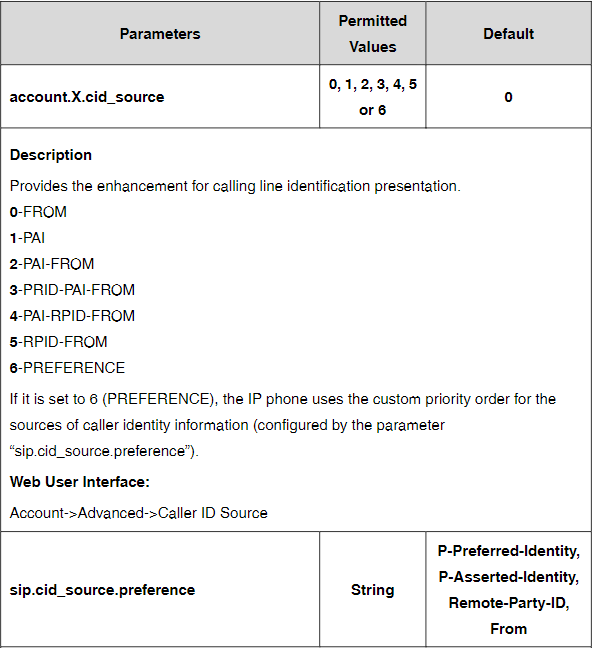
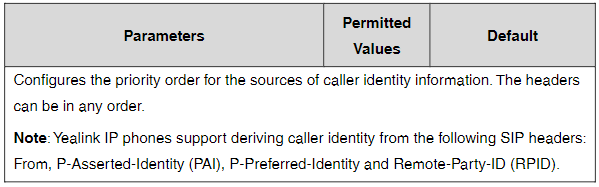
For example, configure the parameter of account 1 for supporting calling line identificationfrom PAI and FROMSIP headers, the following parameter must be added in the configuration file:
account.1.cid_source= 2
2.Upload theconfiguration filetothe root directory of the download server and perform auto provisioning to configure the Yealink IP phones.
For more information on auto provisioning, refer to the latest Auto Provisioning Guide on Yealink Technical Support.

Cost-effective Wi-Fi IP Phone Solution

Wireless coverage range of about 50m indoors and up to 300m outdoors

Professional ruggedized phone system for challenging environments

Elite desktop phone for executives and professionals

HD IP Conference Phone for on-the-go needs and huddle rooms
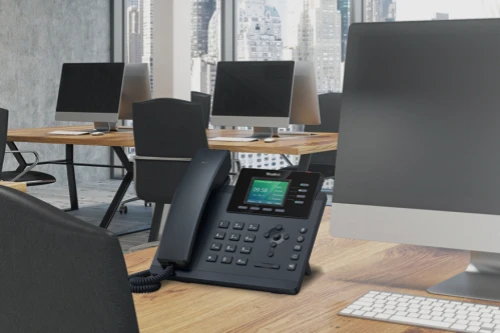
Well-rounded Office Phone & Cost-effective WiFi IP phone
Contact Us
Contact us for product quotes and installation consultations. We will promptly notify a local dealer to provide you with accurate and efficient service solutions.